/*
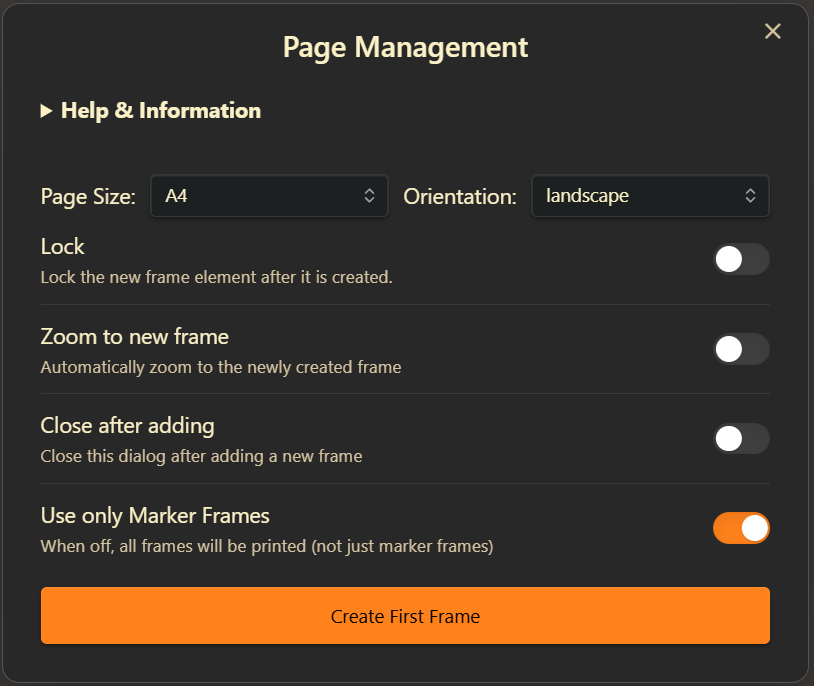
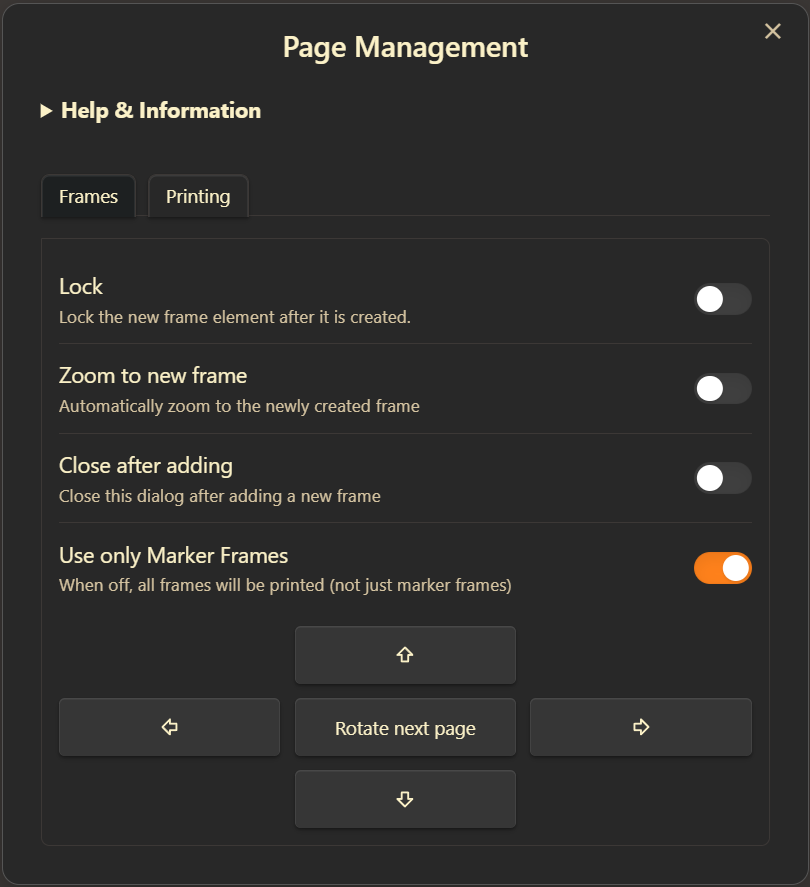
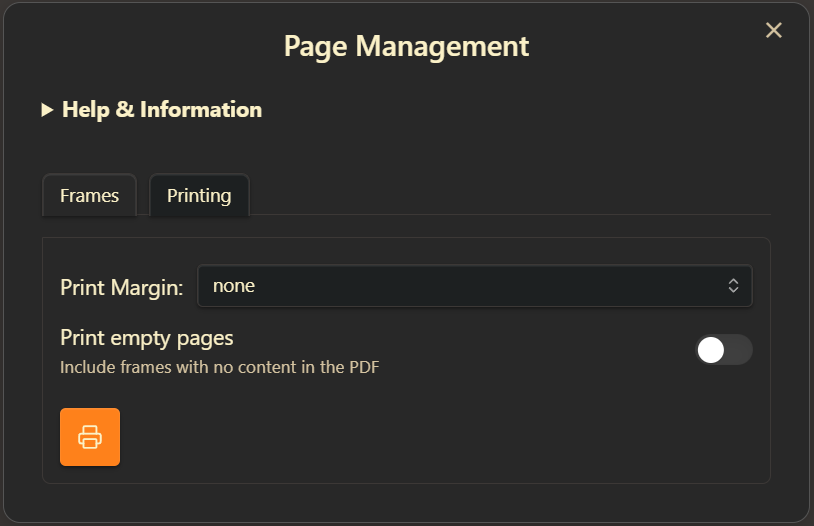
Export Excalidraw to PDF Pages: Define printable page areas using frames, then export each frame as a separate page in a multi-page PDF. Perfect for turning your Excalidraw drawings into printable notes, handouts, or booklets. Supports standard and custom page sizes, margins, and easy frame arrangement.
*/
if(!ea.verifyMinimumPluginVersion || !ea.verifyMinimumPluginVersion("2.15.0")) {
new Notice("This script requires a newer version of Excalidraw. Please install the latest version.");
return;
}
if(window.excalidrawPrintableLayoutWizardModal) {
window.excalidrawPrintableLayoutWizardModal.open();
return;
}
// Help text for the script
const HELP_TEXT = `
**Easily split your Excalidraw drawing into printable pages!**
If you find this script helpful, consider [buying me a coffee](https://ko-fi.com/zsolt). Thank you.
---
### How it works
- **Define Pages:** Use frames to mark out each page area in your drawing. You can create the first frame with this script (choose a standard size or orientation), or draw your own frame for a custom page size.
- **Add More Pages:** Select a frame, then use the arrow buttons to add new frames next to it. All new frames will match the size of the selected one.
- **Rename Frames:** You can rename frames as you like. When exporting to PDF, pages will be ordered alphabetically by frame name.
---
### Important Notes
- **Same Size & Orientation:** All frames must have the same size and orientation (e.g., all A4 Portrait) to export to PDF. Excalidraw currently does not support PDFs with different-sized pages.
- **Custom Sizes:** If you draw your own frame, the PDF will use that exact size—great for custom page layouts!
- **Margins:** If you set a margin, the page size stays the same, but your content will shrink to fit inside the printable area.
- **No Frame Borders/Titles in Print:** Frame borders and frame titles will *not* appear in the PDF.
- **No Frame Clipping:** The script disables frame clipping for this drawing.
- **Templates:** You can save a template document with prearranged frames (even locked ones) for reuse.
- **Lock Frames:** Frames only define print areas—they don't "contain" elements. Locking frames is recommended to prevent accidental movement.
- **Outside Content:** Anything outside the frames will *not* appear in the PDF.
---
### Printing
- **Export to PDF:** Click the printer button to export each frame as a separate page in a PDF.
- **Order:** Pages are exported in alphabetical order of frame names.
---
### Settings
You can also access script settings at the bottom of Excalidraw Plugin settings. The script stores your preferences for:
- Locking new frames after creation
- Zooming to new frames
- Closing the dialog after adding a frame
- Default page size and orientation
- Print margin
---
**Tip:** For more on templates, see [Mastering Excalidraw Templates](https://youtu.be/jgUpYznHP9A). For referencing pages in markdown, see [Image Fragments](https://youtu.be/sjZfdqpxqsg) and [Image Block References](https://youtu.be/yZQoJg2RCKI).


`;
async function run() {
modal = new ea.FloatingModal(ea.plugin.app);
window.excalidrawPrintableLayoutWizardModal = modal;
modal.contentEl.empty();
let shouldRestart = false;
// Enable frame rendering
const st = ea.getExcalidrawAPI().getAppState();
let {enabled, clip, name, outline, markerName, markerEnabled} = st.frameRendering;
if(!enabled || !name || !outline || !markerEnabled || !markerName) {
ea.viewUpdateScene({
appState: {
frameRendering: {
enabled: true,
clip: clip,
name: true,
outline: true,
markerName: true,
markerEnabled: true
}
}
});
}
// Page size options (using standard sizes from ExcalidrawAutomate)
const PAGE_SIZES = [
"A0", "A1", "A2", "A3", "A4", "A5", "A6",
"Letter", "Legal", "Tabloid", "Ledger"
];
const PAGE_ORIENTATIONS = ["portrait", "landscape"];
// Margin sizes in points
const MARGINS = {
"none": 0,
"tiny": 10,
"normal": 60,
};
// Initialize settings
let settings = ea.getScriptSettings();
let dirty = false;
// Define setting keys
const PAGE_SIZE = "Page size";
const ORIENTATION = "Page orientation";
const MARGIN = "Print-margin";
const LOCK_FRAME = "Lock frame after it is created";
const SHOULD_ZOOM = "Should zoom after adding page";
const SHOULD_CLOSE = "Should close after adding page";
const PRINT_EMPTY = "Print empty pages";
const PRINT_MARKERS_ONLY = "Print only marker frames";
// Set default values on first run
if (!settings[PAGE_SIZE]) {
settings = {};
settings[PAGE_SIZE] = { value: "A4", valueset: PAGE_SIZES };
settings[ORIENTATION] = { value: "portrait", valueset: PAGE_ORIENTATIONS };
settings[MARGIN] = { value: "none", valueset: Object.keys(MARGINS)};
settings[SHOULD_ZOOM] = { value: false };
settings[SHOULD_CLOSE] = { value: false };
settings[LOCK_FRAME] = { value: true };
settings[PRINT_EMPTY] = { value: false };
settings[PRINT_MARKERS_ONLY] = { value: true };
dirty = true;
}
//once off correction. In the first version I incorrectly used valueSet with wrong casing.
if(settings[PAGE_SIZE].valueSet) {
settings[PAGE_SIZE].valueset = settings[PAGE_SIZE].valueSet;
delete settings[PAGE_SIZE].valueSet;
settings[ORIENTATION].valueset = settings[ORIENTATION].valueSet;
delete settings[ORIENTATION].valueSet;
settings[MARGIN].valueset = settings[MARGIN].valueSet;
delete settings[MARGIN].valueSet;
dirty = true;
}
if(!settings[LOCK_FRAME]) {
settings[LOCK_FRAME] = { value: true };
dirty = true;
}
if(!settings[PRINT_EMPTY]) {
settings[PRINT_EMPTY] = { value: false };
dirty = true;
}
if(!settings[PRINT_MARKERS_ONLY]) {
settings[PRINT_MARKERS_ONLY] = { value: true };
dirty = true;
}
let lockFrame = settings[LOCK_FRAME].value;
let shouldClose = settings[SHOULD_CLOSE].value;
let shouldZoom = settings[SHOULD_ZOOM].value;
let printEmptyPages = settings[PRINT_EMPTY].value;
let printMarkersOnly = settings[PRINT_MARKERS_ONLY].value;
const getSortedFrames = () => {
return ea.getViewElements()
.filter(el => isEligibleFrame(el))
.sort((a, b) => {
const nameA = a.name || "";
const nameB = b.name || "";
return nameA.localeCompare(nameB);
});
};
// Find existing page frames and determine next page number
const findExistingPages = (selectLastFrame = false) => {
const frameElements = getSortedFrames();
// Extract page numbers from frame names
const pageNumbers = frameElements
.map(frame => {
const match = frame.name?.match(/(?:Page\s+)?(\d+)/i);
return match ? parseInt(match[1]) : 0;
})
.filter(num => !isNaN(num));
// Find the highest page number
const nextPageNumber = pageNumbers.length > 0
? Math.max(...pageNumbers) + 1
: 1;
if(selectLastFrame && frameElements.length > 0) {
ea.selectElementsInView([frameElements[frameElements.length-1]]);
}
return {
frames: frameElements,
nextPageNumber: nextPageNumber
};
};
const isEligibleFrame = (el) => el.type === "frame" && (printMarkersOnly ? el.frameRole === "marker" : true);
// Check if there are frames in the scene and if a frame is selected
let existingFrames = ea.getViewElements().filter(el => isEligibleFrame(el));
let selectedFrame = ea.getViewSelectedElements().find(el => isEligibleFrame(el));
const hasFrames = existingFrames.length > 0;
if(hasFrames && !selectedFrame) {
if(st.activeLockedId && existingFrames.find(f=>f.id === st.activeLockedId)) {
selectedFrame = existingFrames.find(f=>f.id === st.activeLockedId);
ea.viewUpdateScene({ appState: { activeLockedId: null }});
ea.selectElementsInView([selectedFrame]);
} else {
findExistingPages(true);
selectedFrame = ea.getViewSelectedElements().find(el => isEligibleFrame(el));
}
}
const hasSelectedFrame = !!selectedFrame;
// rotation is now a temporary UI state controlled by the center button
let rotateOnAdd = false;
let centerRotateBtn = null;
const setRotateBtnActive = (active) => {
if (!centerRotateBtn) return;
centerRotateBtn.classList.toggle("is-accent", active);
centerRotateBtn.setAttribute("aria-pressed", active ? "true" : "false");
};
// Show notice if there are frames but none selected
if (hasFrames && !hasSelectedFrame) {
new Notice("Select a frame before running the script", 7000);
return;
}
// Create the first frame
const createFirstFrame = async (pageSize, orientation) => {
// Use ExcalidrawAutomate's built-in function to get page dimensions
const dimensions = ea.getPagePDFDimensions(pageSize, orientation);
if (!dimensions) {
new Notice("Invalid page size selected");
return;
}
// Save settings when creating first frame
if (settings[PAGE_SIZE].value !== pageSize) {
settings[PAGE_SIZE].value = pageSize;
dirty = true;
}
if (settings[ORIENTATION].value !== orientation) {
settings[ORIENTATION].value = orientation;
dirty = true;
}
// Format page number with leading zero
const pageName = "01";
// Calculate position to center the frame
const appState = ea.getExcalidrawAPI().getAppState();
const x = (appState.width - dimensions.width) / 2;
const y = (appState.height - dimensions.height) / 2;
return await addFrameElement(x, y, dimensions.width, dimensions.height, pageName, true);
};
// Add new page frame
const addPage = async (direction, pageSize, orientation) => {
selectedFrame = ea.getViewSelectedElements().find(el => isEligibleFrame(el));
if (!selectedFrame) {
const { activeLockedId } = ea.getExcalidrawAPI().getAppState();
if(activeLockedId) {
selectedFrame = ea.getViewElements().find(el=>el.id === activeLockedId && isEligibleFrame(el));
}
if (!selectedFrame) return;
}
ea.viewUpdateScene({appState: {activeLockedId: null}});
const { frames, nextPageNumber } = findExistingPages();
// Get dimensions from selected frame, support optional rotation
const dimensions = {
width: rotateOnAdd ? selectedFrame.height : selectedFrame.width,
height: rotateOnAdd ? selectedFrame.width : selectedFrame.height
};
// Format page number with leading zero
const pageName = `${nextPageNumber.toString().padStart(2, '0')}`;
// Calculate position based on direction and selected frame
let x = 0;
let y = 0;
switch (direction) {
case "right":
x = selectedFrame.x + selectedFrame.width;
y = selectedFrame.y;
break;
case "left":
x = selectedFrame.x - dimensions.width;
y = selectedFrame.y;
break;
case "down":
x = selectedFrame.x;
y = selectedFrame.y + selectedFrame.height;
break;
case "up":
x = selectedFrame.x;
y = selectedFrame.y - dimensions.height;
break;
}
const added = await addFrameElement(x, y, dimensions.width, dimensions.height, pageName);
// reset the rotate toggle after adding the frame
rotateOnAdd = false;
setRotateBtnActive(false);
return added;
};
addFrameElement = async (x, y, width, height, pageName, repositionToCursor = false) => {
const frameId = ea.addFrame(x, y, width, height, pageName);
ea.getElement(frameId).frameRole = "marker";
if(lockFrame) {
ea.getElement(frameId).locked = true;
}
await ea.addElementsToView(repositionToCursor);
const addedFrame = ea.getViewElements().find(el => el.id === frameId);
if(shouldZoom) {
ea.viewZoomToElements(true, [addedFrame]);
} else {
ea.selectElementsInView([addedFrame]);
}
//ready for the next frame
ea.clear();
selectedFrame = addedFrame;
if(shouldClose) {
modal.close();
}
return addedFrame;
}
const translateToZero = ({ x, y, width, height }, padding=0) => {
const top = y, left = x, right = x + width, bottom = y + height;
const {topX, topY, width:w, height:h} = ea.getBoundingBox(ea.getViewElements());
const newTop = top - (topY - padding);
const newLeft = left - (topX - padding);
const newBottom = bottom - (topY - padding);
const newRight = right - (topX - padding);
return {
top: newTop,
left: newLeft,
bottom: newBottom,
right: newRight,
};
}
// NEW: detect if any non-frame element overlaps the given area
const hasElementsInArea = (area) => ea.getElementsInArea(ea.getViewElements(), area).length>0;
const checkFrameSizes = (frames) => {
if (frames.length <= 1) return true;
const referenceWidth = frames[0].width;
const referenceHeight = frames[0].height;
return frames.every(frame =>
Math.abs(frame.width - referenceWidth) < 1 &&
Math.abs(frame.height - referenceHeight) < 1
);
};
const printToPDF = async (marginSize) => {
const margin = MARGINS[marginSize] || 0;
// Save margin setting
if (settings[MARGIN].value !== marginSize) {
settings[MARGIN].value = marginSize;
dirty = true;
}
// Get all frame elements and sort by name
const frames = getSortedFrames();
if (frames.length === 0) {
new Notice("No frames found to print");
return;
}
// Create a notice during processing
const notice = new Notice("Preparing PDF, please wait...", 0);
// Create SVGs for each frame
const svgPages = [];
let placeholderRects = [];
ea.clear();
for (const frame of frames) {
ea.style.opacity = 0;
ea.style.roughness = 0;
ea.style.fillStyle = "solid";
ea.style.backgroundColor = "black"
ea.style.strokeWidth = 0.01;
ea.addRect(frame.x, frame.y, frame.width, frame.height);
}
const svgScene = await ea.createViewSVG({
withBackground: true,
theme: st.theme,
//frameRendering: { enabled: false, name: false, outline: false, clip: false },
padding: 0,
selectedOnly: false,
skipInliningFonts: false,
embedScene: false,
elementsOverride: ea.getViewElements().concat(ea.getElements()),
});
ea.clear();
for (const frame of frames) {
// NEW: skip empty frames unless user opted to print them
if(!printEmptyPages && !hasElementsInArea(frame)) continue;
const { top, left, bottom, right } = translateToZero(frame);
//always create the new SVG in the main Obsidian workspace (not the popout window, if present)
const host = window.createDiv();
host.innerHTML = svgScene.outerHTML;
const clonedSVG = host.firstElementChild;
const width = Math.abs(left-right);
const height = Math.abs(top-bottom);
clonedSVG.setAttribute("viewBox", `${left} ${top} ${width} ${height}`);
clonedSVG.setAttribute("width", `${width}`);
clonedSVG.setAttribute("height", `${height}`);
svgPages.push(clonedSVG);
}
// NEW: abort if nothing to print
if(svgPages.length === 0) {
notice.hide();
new Notice("No pages to print (all selected frames are empty)");
notice.hide();
return;
}
// Use dimensions from the first frame
const width = frames[0].width;
const height = frames[0].height;
// Create PDF
await ea.createPDF({
SVG: svgPages,
scale: { fitToPage: true },
pageProps: {
dimensions: {},
//dimensions: { width, height },
backgroundColor: "#ffffff",
margin: {
left: margin,
right: margin,
top: margin,
bottom: margin
},
alignment: "center"
},
filename: ea.targetView.file.basename + "-pages.pdf"
});
notice.hide();
};
// -----------------------
// Create a floating modal
// -----------------------
modal.titleEl.setText("Page Management");
modal.titleEl.style.textAlign = "center";
modal.onClose = async () => {
delete window.excalidrawPrintableLayoutWizardModal;
if (dirty) {
await ea.setScriptSettings(settings);
}
ea.viewUpdateScene({
appState: {
frameRendering: {enabled, clip, name, outline, markerName, markerEnabled}
}
});
if(shouldRestart) setTimeout(()=>run());
};
// Create modal content
modal.contentEl.createDiv({ cls: "excalidraw-page-manager" }, div => {
const container = div.createDiv({
attr: {
style: "display: flex; flex-direction: column; gap: 15px; padding: 10px;"
}
});
// Help section
const helpDiv = container.createDiv({
attr: {
style: "margin-bottom: 10px;"
}
});
helpDiv.createEl("details", {}, (details) => {
details.createEl("summary", {
text: "Help & Information",
attr: {
style: "cursor: pointer; font-weight: bold; margin-bottom: 10px;"
}
});
details.createEl("div", {
attr: {
style: "padding: 10px; border: 1px solid var(--background-modifier-border); border-radius: 4px; margin-top: 8px; font-size: 0.9em; max-height: 300px; overflow-y: auto;"
}
}, div => {
ea.obsidian.MarkdownRenderer.render(ea.plugin.app, HELP_TEXT, div, "", ea.plugin)
});
});
// Tabs (show only when frames exist)
let framesTabEl, printingTabEl, tabsHeaderEl, marginDropdown;
if (hasFrames) {
tabsHeaderEl = container.createDiv({
attr: { style: "display:flex; gap:8px; border-bottom:1px solid var(--background-modifier-border); padding-bottom:0;" }
});
tabsHeaderEl.addClass("tabs-header"); // NEW
const framesTabBtn = tabsHeaderEl.createEl("button", {
text: "Frames",
attr: { style: "padding:8px 12px; cursor:pointer;" }
});
framesTabBtn.addClass("tab-btn"); // NEW
const printingTabBtn = tabsHeaderEl.createEl("button", {
text: "Printing",
attr: { style: "padding:8px 12px; cursor:pointer;" }
});
printingTabBtn.addClass("tab-btn"); // NEW
const tabsBody = container.createDiv();
tabsBody.addClass("tab-panels"); // NEW
framesTabEl = tabsBody.createDiv({ attr: { style: "display:block;" } });
framesTabEl.addClass("tab-panel"); // NEW
printingTabEl = tabsBody.createDiv({ attr: { style: "display:none;" } });
printingTabEl.addClass("tab-panel"); // NEW
const activate = (tab) => {
if (tab === "frames") {
framesTabEl.style.display = "";
printingTabEl.style.display = "none";
framesTabBtn.classList.add("is-active");
printingTabBtn.classList.remove("is-active");
} else {
framesTabEl.style.display = "none";
printingTabEl.style.display = "";
framesTabBtn.classList.remove("is-active");
printingTabBtn.classList.add("is-active");
}
};
framesTabBtn.addEventListener("click", () => {
window.excalidrawPrintLayoutWizard = "frames";
activate("frames")
});
printingTabBtn.addEventListener("click", () => {
window.excalidrawPrintLayoutWizard = "printing";
activate("printing")
});
activate(window.excalidrawPrintLayoutWizard ?? "frames");
} else {
// No frames yet, only frames tab content
framesTabEl = container.createDiv();
}
const createOptionsContainerCommonControls = (optionsContainer) => {
new ea.obsidian.Setting(optionsContainer)
.setName("Lock")
.setDesc("Lock the new frame element after it is created.")
.addToggle(toggle => {
toggle.setValue(lockFrame).onChange(value => {
lockFrame = value;
if (settings[LOCK_FRAME].value !== value) {
settings[LOCK_FRAME].value = value; dirty = true;
}
});
});
new ea.obsidian.Setting(optionsContainer)
.setName("Zoom to new frame")
.setDesc("Automatically zoom to the newly created frame")
.addToggle(toggle => {
toggle.setValue(shouldZoom).onChange(value => {
shouldZoom = value;
if (settings[SHOULD_ZOOM].value !== value) {
settings[SHOULD_ZOOM].value = value; dirty = true;
}
});
});
new ea.obsidian.Setting(optionsContainer)
.setName("Close after adding")
.setDesc("Close this dialog after adding a new frame")
.addToggle(toggle => {
toggle.setValue(shouldClose).onChange(value => {
shouldClose = value;
if (settings[SHOULD_CLOSE].value !== value) {
settings[SHOULD_CLOSE].value = value; dirty = true;
}
});
});
new ea.obsidian.Setting(optionsContainer)
.setName("Use only Marker Frames")
.setDesc("When off, all frames will be printed (not just marker frames)")
.addToggle(toggle => {
toggle.setValue(printMarkersOnly).onChange(value => {
printMarkersOnly = value;
if (settings[PRINT_MARKERS_ONLY].value !== value) {
settings[PRINT_MARKERS_ONLY].value = value;
dirty = true;
shouldRestart = true;
modal.close();
}
});
});
}
// FRAMES TAB CONTENT
// When no frames yet: initial size/orientation inputs and Create First Frame button
if (!hasFrames) {
const settingsContainer = framesTabEl.createDiv({
attr: {
// four columns: label + input, label + input
style: "display: grid; grid-template-columns: auto 1fr auto 1fr; gap: 10px; align-items: center;"
}
});
// Page Size
settingsContainer.createEl("label", { text: "Page Size:" });
const pageSizeDropdown = settingsContainer.createEl("select", {
cls: "dropdown",
attr: { style: "width: 100%;" }
});
PAGE_SIZES.forEach(size => pageSizeDropdown.createEl("option", { text: size, value: size }));
pageSizeDropdown.value = settings[PAGE_SIZE].value;
// Orientation
settingsContainer.createEl("label", { text: "Orientation:" });
const orientationDropdown = settingsContainer.createEl("select", {
cls: "dropdown",
attr: { style: "width: 100%;" }
});
PAGE_ORIENTATIONS.forEach(orientation => orientationDropdown.createEl("option", { text: orientation, value: orientation }));
orientationDropdown.value = settings[ORIENTATION].value;
const optionsContainer = framesTabEl.createDiv({ attr: { style: "margin-top: 10px;" } });
createOptionsContainerCommonControls(optionsContainer);
// Create First Frame button
const buttonContainer = framesTabEl.createDiv({
attr: { style: "display: grid; grid-template-columns: 1fr; gap: 10px; margin-top: 10px;" }
});
const createFirstBtn = buttonContainer.createEl("button", {
cls: "page-btn",
attr: { style: "height: 40px; background-color: var(--interactive-accent); color: var(--text-on-accent);" }
});
createFirstBtn.textContent = "Create First Frame";
createFirstBtn.addEventListener("click", async () => {
const tmpShouldClose = shouldClose;
shouldClose = true;
await createFirstFrame(pageSizeDropdown.value, orientationDropdown.value);
shouldClose = tmpShouldClose;
if(!shouldClose) {
shouldRestart = true;
modal.close()
}
});
} else {
// hasFrames: frame-management options + arrow buttons
const optionsContainer = framesTabEl.createDiv({ attr: { style: "margin-top: 10px;" } });
createOptionsContainerCommonControls(optionsContainer);
// Arrow buttons with center rotate toggle
const buttonContainer = framesTabEl.createDiv({
attr: {
style: "display: grid; grid-template-columns: repeat(3, 1fr); gap: 10px; margin-top: 10px;"
}
});
const upBtn = buttonContainer.createEl("button", {
cls: "page-btn",
attr: { style: "grid-column: 2; grid-row: 1; height: 40px;" }
});
upBtn.innerHTML = ea.obsidian.getIcon("arrow-big-up").outerHTML;
upBtn.addEventListener("click", async () => { await addPage("up"); });
buttonContainer.createDiv({ attr: { style: "grid-column: 3; grid-row: 1;" } });
const leftBtn = buttonContainer.createEl("button", {
cls: "page-btn",
attr: { style: "grid-column: 1; grid-row: 2; height: 40px;" }
});
leftBtn.innerHTML = ea.obsidian.getIcon("arrow-big-left").outerHTML;
leftBtn.addEventListener("click", async () => { await addPage("left"); });
// Center toggle: Rotate next page
centerRotateBtn = buttonContainer.createEl("button", {
cls: "page-btn",
attr: { style: "grid-column: 2; grid-row: 2; height: 40px;" }
});
centerRotateBtn.textContent = "Rotate next page";
centerRotateBtn.addEventListener("click", () => {
rotateOnAdd = !rotateOnAdd;
setRotateBtnActive(rotateOnAdd);
});
setRotateBtnActive(rotateOnAdd);
const rightBtn = buttonContainer.createEl("button", {
cls: "page-btn",
attr: { style: "grid-column: 3; grid-row: 2; height: 40px;" }
});
rightBtn.innerHTML = ea.obsidian.getIcon("arrow-big-right").outerHTML;
rightBtn.addEventListener("click", async () => { await addPage("right"); });
const downBtn = buttonContainer.createEl("button", {
cls: "page-btn",
attr: { style: "grid-column: 2; grid-row: 3; height: 40px;" }
});
downBtn.innerHTML = ea.obsidian.getIcon("arrow-big-down").outerHTML;
downBtn.addEventListener("click", async () => { await addPage("down"); });
buttonContainer.createDiv({ attr: { style: "grid-column: 1; grid-row: 3;" } });
}
// PRINTING TAB CONTENT (only when hasFrames)
if (hasFrames && printingTabEl) {
const marginContainer = printingTabEl.createDiv({
attr: {
style: "display: grid; grid-template-columns: auto 1fr; gap: 10px; align-items: center; margin-top: 6px;"
}
});
marginContainer.createEl("label", { text: "Print Margin:" });
marginDropdown = marginContainer.createEl("select", { cls: "dropdown", attr: { style: "width: 100%;" } });
Object.keys(MARGINS).forEach(margin => marginDropdown.createEl("option", { text: margin, value: margin }));
marginDropdown.value = settings[MARGIN].value;
const printingOptions = printingTabEl.createDiv({ attr: { style: "margin-top: 10px;" } });
new ea.obsidian.Setting(printingOptions)
.setName(PRINT_EMPTY)
.setDesc("Include frames with no content in the PDF")
.addToggle(toggle => {
toggle.setValue(printEmptyPages).onChange(value => {
printEmptyPages = value;
if(settings[PRINT_EMPTY].value !== value) {
settings[PRINT_EMPTY].value = value;
dirty = true;
}
});
});
const printBtnRow = printingTabEl.createDiv({ attr: { style: "margin-top: 10px; display:flex; justify-content:flex-start;" } });
const printBtn = printBtnRow.createEl("button", {
cls: "page-btn",
attr: { style: "height: 40px; background-color: var(--interactive-accent);" }
});
printBtn.innerHTML = ea.obsidian.getIcon("printer").outerHTML;
printBtn.addEventListener("click", async () => { await printToPDF(marginDropdown.value); });
}
// CSS
div.createEl("style", {
text: `
.page-btn {
display: flex;
justify-content: center;
align-items: center;
cursor: pointer;
border-radius: 4px;
}
.page-btn:hover {
background-color: var(--interactive-hover);
}
.dropdown {
height: 30px;
background-color: var(--background-secondary);
color: var(--text-normal);
border-radius: 4px;
border: 1px solid var(--background-modifier-border);
padding: 0 10px;
}
.is-active {
background-color: var(--background-modifier-hover);
border-radius: 4px;
}
/* Tabs styling - NEW */
.tabs-header {
gap: 8px;
border-bottom: 1px solid var(--background-modifier-border);
}
.tabs-header .tab-btn {
background: var(--background-primary);
color: var(--text-normal);
border: 1px solid var(--background-modifier-border);
border-bottom: none;
border-top-left-radius: 6px;
border-top-right-radius: 6px;
border-bottom-left-radius: 0;
border-bottom-right-radius: 0;
padding: 8px 12px;
margin-bottom: -1px; /* sit on top of the panel border */
}
.tabs-header .tab-btn:hover {
background: var(--background-modifier-hover);
}
.tabs-header .tab-btn.is-active {
background: var(--background-secondary);
color: var(--text-normal);
position: relative;
z-index: 2;
}
.tab-panels {
border: 1px solid var(--background-modifier-border);
border-radius: 0 6px 6px 6px; /* merge with active tab */
padding: 12px;
background: var(--background-primary);
}
/* accent styling for center rotate toggle when active */
.page-btn.is-accent {
background-color: var(--interactive-accent);
color: var(--text-on-accent);
}
.page-btn.is-accent:hover {
background-color: var(--interactive-accent-hover, var(--interactive-accent));
}
`
});
});
modal.open();
}
run();