/*
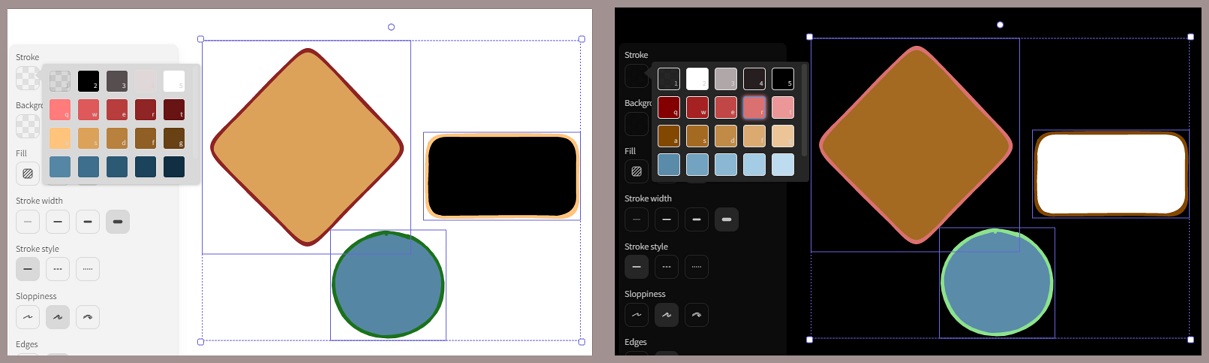
The script inverts the colors on the canvas including the color palette in Element Properties.
This script inverts all the colors in the current Excalidraw drawing. It applies the inversion to:
- The stroke and background colors of every element on the canvas.
- The main canvas background color.
- All colors within the user’s custom color palette, handling all possible configurations (simple arrays, nested arrays, and objects).
- The currently selected stroke and background colors in the UI.
A default color palette is defined to use as a fallback if the current drawing’s palette is missing or empty. // This is based on the standard Excalidraw palette from version 1.6.8.
You’ll find a detailed description of the color palette data structure on the Excalidraw-Obsidian Wiki
const defaultColorPalette = {
  elementStroke: ["#000000", "#343a40", "#495057", "#c92a2a", "#a61e4d", "#862e9c", "#5f3dc4", "#364fc7", "#1864ab", "#0b7285", "#087f5b", "#2b8a3e", "#5c940d", "#e67700", "#d9480f"],
  elementBackground: ["transparent", "#ced4da", "#868e96", "#fa5252", "#e64980", "#be4bdb", "#7950f2", "#4c6ef5", "#228be6", "#15aabf", "#12b886", "#40c057", "#82c91e", "#fab005", "#fd7e14"],
  canvasBackground: ["#ffffff", "#f8f9fa", "#f1f3f5", "#fff5f5", "#fff0f6", "#f8f0fc", "#f3f0ff", "#edf2ff", "#e7f5ff", "#e3fafc", "#e6fcf5", "#ebfbee", "#f4fce3", "#fff9db", "#fff4e6"]
};

// Get the Excalidraw API and the current application state.
const api = ea.getExcalidrawAPI();
const st = api.getAppState();

// Retrieve the current color palette, falling back to the default if necessary.
let colorPalette = st.colorPalette ?? defaultColorPalette;
if (!colorPalette || Object.keys(colorPalette).length === 0) {
  colorPalette = defaultColorPalette;
}
// Ensure each key in the palette has a default value if it's missing.
if (!colorPalette.elementStroke || colorPalette.elementStroke.length === 0) {
  colorPalette.elementStroke = defaultColorPalette.elementStroke;
}
if (!colorPalette.elementBackground || colorPalette.elementBackground.length === 0) {
  colorPalette.elementBackground = defaultColorPalette.elementBackground;
}
if (!colorPalette.canvasBackground || colorPalette.canvasBackground.length === 0) {
  colorPalette.canvasBackground = defaultColorPalette.canvasBackground;
}

/**
 * Inverts a single color string by reversing its lightness value.
 * This function uses the ColorMaster utility provided by Excalidraw Automate.
 * It correctly handles various color formats (HEX, RGB, HSL) and preserves transparency.
 * @param {string} color - The color to be inverted (e.g., "#FF0000").
 * @returns {string} The inverted color string.
 */
const invertColor = (color) => {
  const cm = ea.getCM(color);
  const opts = cm.alpha !== 1 ? { alpha: true } : { alpha: false };
  const lightness = cm.lightness;
  cm.lightnessTo(Math.abs(lightness - 100)); // Invert lightness on a 0-100 scale.
  switch (cm.format) {
    case "hsl": return cm.stringHSL(opts);
    case "rgb": return cm.stringRGB(opts);
    case "hsv": return cm.stringHSV(opts);
    default: return cm.stringHEX(opts);
  }
};

/**
 * Recursively traverses a color palette data structure and inverts every color string found.
 * This robustly handles all valid `colorPalette` configurations, including nested arrays
 * (`string[][]`), simple arrays (`string[]`), and objects (`topPicks`).
 * @param {any} palette - A color string, an array of colors, an array of arrays, or an object palette.
 * @returns {any} A new palette structure with all colors inverted.
 */
const invertPaletteStructure = (palette) => {
  if (typeof palette === 'string') {
    // Base case: If the item is a color string, invert it.
    return invertColor(palette);
  }
  if (Array.isArray(palette)) {
    // If it's an array, recursively call this function for each item.
    return palette.map(item => invertPaletteStructure(item));
  }
  if (typeof palette === 'object' && palette !== null) {
    // If it's an object, create a new object and recursively process its values.
    const newPalette = {};
    for (const key in palette) {
      if (Object.prototype.hasOwnProperty.call(palette, key)) {
        newPalette[key] = invertPaletteStructure(palette[key]);
      }
    }
    return newPalette;
  }
  // Return any other data types (like numbers or null) unchanged.
  return palette;
};

// Generate the new, fully inverted color palette.
const invertedColorPalette = invertPaletteStructure(colorPalette);

// Load all elements from the current view into the Excalidraw Automate workbench for editing.
ea.copyViewElementsToEAforEditing(ea.getViewElements());

// Iterate over all elements and invert their stroke and background colors.
ea.getElements().forEach(el => {
  if (el.strokeColor) {
    el.strokeColor = invertColor(el.strokeColor);
  }
  if (el.backgroundColor) {
    el.backgroundColor = invertColor(el.backgroundColor);
  }
});

// Finally, update the Excalidraw scene with the inverted elements and application state.
ea.viewUpdateScene({
  appState: {
    colorPalette: invertedColorPalette,
    viewBackgroundColor: invertColor(st.viewBackgroundColor),
    currentItemStrokeColor: invertColor(st.currentItemStrokeColor),
    currentItemBackgroundColor: invertColor(st.currentItemBackgroundColor)
  },
  elements: ea.getElements(),
  storeAction: "capture" // Ensures the change is saved and added to the undo/redo history.
});